My JSF Books/Videos My JSF Tutorials OmniFaces/JSF PPTs
JSF 2.3 Tutorial
JSF Caching Tutorial
JSF Navigation Tutorial
JSF Scopes Tutorial
JSF Page Author Beginner's Guide
OmniFaces 2.3 Tutorial Examples
OmniFaces 2.2 Tutorial Examples
JSF Events Tutorial
OmniFaces Callbacks Usages
JSF State Tutorial
JSF and Design Patterns
JSF 2.3 New Features (2.3-m04)
Introduction to OmniFaces
25+ Reasons to use OmniFaces in JSF
OmniFaces Validators
OmniFaces Converters
JSF Design Patterns
Mastering OmniFaces
Reusable and less-verbose JSF code

My JSF Resources ...

Java EE Guardian
Member of JCG Program
Member MVB DZone
Blog curated on ZEEF
OmniFaces is an utility library for JSF, including PrimeFaces, RichFaces, ICEfaces ...

.

.

.

.

.

.

.

.


[OmniFaces Utilities] - Find the right JSF OmniFaces 2 utilities methods/functions

Search on blog

Petition by Java EE Guardians

Twitter

joi, 13 august 2015

[OmniFaces utilities 2.2] Check faces messages existence


[OmniFaces utilities] The isEmpty() method returns true if there are no faces messages, otherwise false
[OmniFaces utilities] The isEmpty(String clientId) method returns true if there are no faces messages for the given client ID, otherwise false
[OmniFaces utilities] The isGlobalEmpty() method returns true if there are no global faces messages, otherwise false


Methods:

Messages#isEmpty() - returns true if there are no faces messages, otherwise false
See also: Faces#getContext()

Messages#isEmpty(String clientId) - returns true if there are no faces messages for the given client ID, otherwise false
See also: Faces#getContext()

Messages#isGlobalEmpty() - returns true if there are no global faces messages, otherwise false
Usage:

We can use some simple logs to understand how each of the above methods works. We suppose that we have a clientIdmyForm:myInput:

LOG.log(Level.INFO, "Messages list is empty ? {0}", Messages.isEmpty());
LOG.log(Level.INFO, "Global messages list is empty ? {0}", Messages.isEmpty(null));
LOG.log(Level.INFO, "Messages list for client Id myForm:myInput is empty ? {0}", Messages.isEmpty("myForm:myInput"));     

·         no messages

Outputs:
Messages list is empty ? true
Global messages list is empty ? true
Messages list for client Id myForm:myInput is empty ? true

·         have some global messages, no clientId specific message (no messages for myForm:myInput)

FacesContext.getCurrentInstance().addMessage(null, 
  new FacesMessage(FacesMessage.SEVERITY_INFO,"Global Info","Dummy info message!"));   

Outputs:
Messages list is empty ? false
Global messages list is empty ? false
Messages list for client Id myForm:myInput is empty ? true

·         have some messages for clientId, myForm:myInput, but no global messages

FacesContext.getCurrentInstance().addMessage("myForm:myInput", 
  new FacesMessage(FacesMessage.SEVERITY_INFO,"Not Global Info","Dummy info message!"));   

Outputs:
Messages list is empty ? false
Global messages list is empty ? true
Messages list for client Id myForm:myInput is empty ? false

·         have some messages for clientId, myForm:myInput and some global messages

FacesContext.getCurrentInstance().addMessage(null, 
  new FacesMessage(FacesMessage.SEVERITY_INFO,"Global Info","Dummy info message!"));   
FacesContext.getCurrentInstance().addMessage("myForm:myInput", 
  new FacesMessage(FacesMessage.SEVERITY_INFO,"Not Global Info","Dummy info message!"));   
    
Outputs:
Messages list is empty ? false
Global messages list is empty ? false
Messages list for client Id myForm:myInput is empty ? false

luni, 10 august 2015

JSF and Factory pattern (CDI aspects) - part II

Read also: JSF and Factory pattern - part I

We can use CDI in JSF, so we can consider the below example the simplest factory method pattern implementation. Basically, the Java EE annotations and dependency injection helps us to simply the things pretty much:

public class Foo {

 @Produces
 public String sayHelloFoo() {
  return "Foo says hello !";
 }
}

@Named
@RequestScoped
public class MyBean {

 @Inject
 private String foo;  
   
 public void fooSays(){
  System.out.println(foo);
 }
}

The sayHelloFoo() is known as a producer method and in this case it produces a String. The "beneficiary" of this String is MyBean, which practically injects this type via @Inject as above. CDI knows where to inject the produced String because the produced type is the same as the injected type.

But, a producer method can produce anything else, like primitive data types or objects. For example, let's suppose that we have the Foo object:

public class Foo {

 public String sayHelloFoo() {
  return "Foo says hello !";
 }
}

Now, the producer will produce Foo instances instead of String:

public class FooProducer {

 @Produces
 public Foo fooFactory() {
  return new Foo();
 }    
}

And MyBean will inject Foo type (with other words, the container is injecting the beans created by the factory using the @Inject annotation):

@Named
@RequestScoped
public class MyBean {

 @Inject
 private Foo foo;  
   
 public void fooSays(){
  System.out.println(foo.sayHelloFoo());
 }
}

But, this example will produce an error of type: WELD-001409: Ambiguous dependencies for type Foo with qualifiers @Default. Remember that we said that CDI relies on types to determine where to inject the produced type, but in this case we have two instances of the Foo:

Possible dependencies:
 - Producer Method [Foo] with qualifiers [@Any @Default] declared as [[BackedAnnotatedMethod] @Produces public beans.FooBuzzProducer.fooFactory()],
 - Managed Bean [class beans.Foo] with qualifiers [@Any @Default],

So, the container doesn't know which instance to inject! This is causing an ambiguity!

The solution relies on CDI qualifiers. The qualifiers have the power to disambiguate the beans. For this, we use the @Qualifier and @interface annotations, as below (further reading about qualifiers: Create Qualifiers for CDI Beans and Using Qualifiers):

@Qualifier
@Retention(RUNTIME)
@Target({METHOD, FIELD})
public @interface FooQualifier {
}

Further, the qualifier is used to annotate the producer method:

public class FooProducer {

 @Produces @FooQualifier
 public Foo fooFactory() {
  return new Foo();
 }    
}

And the injection points also:

@Named
@RequestScoped
public class MyBean {

 @Inject @FooQualifier
 private Foo foo;  
   
 public void fooSays(){
  System.out.println(foo.sayHelloFoo());
 }
}

Now, let's have an example with a producer for two types, Foo and Buzz.

public class Foo {

 public String sayHelloFoo() {
  return "Foo says hello !";
 }
}

public class Buzz {

 public String sayHelloBuzz() {
  return "Buzz says hello !";
 }
}

For each of them we need a qualifier:

@Qualifier
@Retention(RUNTIME)
@Target({METHOD, FIELD})
public @interface FooQualifier {
}

@Qualifier
@Retention(RUNTIME)
@Target({METHOD, FIELD})
public @interface BuzzQualifier {
}

Now, we have a producer for Foo and Buzz:

public class FooBuzzProducer {

 @Produces @FooQualifier
 public Foo fooFactory() {
  return new Foo();
 }
   
 @Produces @BuzzQualifier
 public Buzz buzzFactory() {
  return new Buzz();
 }
}

And, finally exploit the factory in MyBean:

@Named
@RequestScoped
public class MyBean {

 @Inject @FooQualifier
 private Foo foo;
   
 @Inject @BuzzQualifier
 private Buzz buzz;
   
 public void fooSays(){
  System.out.println(foo.sayHelloFoo());
 }
   
 public void buzzSays(){
  System.out.println(buzz.sayHelloBuzz());
 }
}

Use @Any and factory pattern

Further, let's complicate the things and let's suppose that we have the following interface:

public interface CharacterType {

 public String sayHello();
}

Think that you have several implementations of this interface (e.g. Foo, Buzz).  Based on the above examples, you can implement the factory pattern by writing a producer method for each implementation. This way you will obtain a pretty clumsy to maintain code because adding a new implementation will involve adding a new producer, removing an existing implementation will require to remove the producer and so on. Java EE comes to rescue this situation via @Any annotation, which allows an injection point to refer to all beans or all events of a certain bean type. With other words, it will allows us to instruct the container that all beans implementing the given interface (e.g. CharacterType) should be injected at that injection point. Further, you can use a simple trick to distinguish between the injected beans. This trick take usage of annotation literals and enum types. First, we define a qualifier that uses an enum of character types:

@Qualifier
@Retention(RUNTIME)
@Target({METHOD, FIELD, PARAMETER, TYPE})
public @interface CharacterQualifier {

 Type value();
 enum Type {
  FOO, BUZZ
 }
}

Next, each CharacterType implementation is annotated with this qualifier and the corresponding type:

@CharacterQualifier(CharacterQualifier.Type.FOO)
@Dependent
public class Foo implements CharacterType {

 @Override
 public String sayHello() {
  return "Foo says hello !";
 }
}

@CharacterQualifier(CharacterQualifier.Type.BUZZ)
@Dependent
public class Buzz implements CharacterType {

 @Override
 public String sayHello() {
  return "Buzz says hello !";
 }
}

The next step consist in creating an AnnotationLiteral.  In order to select the dependency you need to compare it with the enum type (FOO, BUZZ) of the qualifier(CharacterQualifier)  of each implementation by creating an AnnotationLiteral of the corresponding type:

@SuppressWarnings("AnnotationAsSuperInterface")
public class CharacterLiteral extends AnnotationLiteral<CharacterQualifier> implements CharacterQualifier {

 private static final long serialVersionUID = 1L;
 private final Type type;

 public CharacterLiteral(Type type) {
  this.type = type;
 }

 @Override
 public Type value() {
  return type;
 }
}

Now the factory class is pretty simple:

@Dependent
public class CharactersFactory {

 @Inject @Any
 private Instance<CharacterType> characters;

 public CharacterType getCharacter(CharacterQualifier.Type type) {
  CharacterLiteral characterLiteral = new CharacterLiteral(type);
  Instance<CharacterType> characterType = characters.select(characterLiteral);
  return characterType.get();
 }
}

The client of our factory needs to inject this factory and invoke the getCharacter() method. Of course, the client needs to indicate the character type (e.g. BUZZ type):

@Named
@RequestScoped
public class MyBean {

 @Inject
 CharactersFactory factory;

 public void characterSays() {
  CharacterType buzz = factory.getCharacter(CharacterQualifier.Type.BUZZ);
  System.out.println(buzz.sayHello());
 }
}

joi, 6 august 2015

JSF and Factory pattern - part I

Read also: JSF and Factory pattern (CDI aspects) - part II

The Factory pattern is commonly used to create objects via:

·         factory method pattern - defines a method that creates and return new objects
·         abstract factory pattern - delegates a subclass to create new objects

The main idea consist in the fact that the object is abstracted away from where it will be used!

Factory method pattern

Factory Method is a Creational Design Pattern with the following object structural:

The GoF (Erich Gamma, Richard Helm, Ralph Johnson, John Vlissides) book describes this pattern as "An interface for creating an object, but let the subclasses decide which class to instantiate. The Factory method lets a class defer instantiation to subclasses."

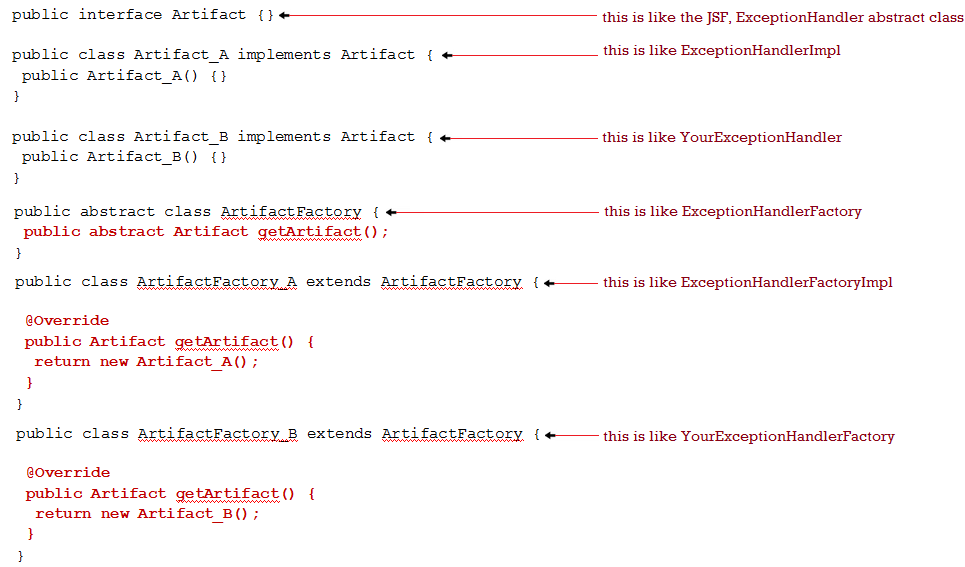
Let's suppose that we have the following objects (artifacts):

public interface Artifact {}

public class Artifact_A implements Artifact {
 public Artifact_A() {}
}

public class Artifact_B implements Artifact {
 public Artifact_B() {}
}

Further, we define an abstract class that will be extended later by the concrete implementations. Here we write the factory method signature - this method should be capable to return Artifacts:

public abstract class ArtifactFactory {
 public abstract Artifact getArtifact();
}

Next, we have two factory implementations:

public class ArtifactFactory_A extends ArtifactFactory {

 @Override
 public Artifact getArtifact() {
  return new Artifact_A();
 }  
}

public class ArtifactFactory_B extends ArtifactFactory {

 @Override
 public Artifact getArtifact() {
  return new Artifact_B();
 }   
}

Now,  some simple usages:

ArtifactFactory artifactFactory = new ArtifactFactory_A();
Artifact artifact = artifactFactory.getArtifact();
Artifact_A artifact_A = (Artifact_A)artifactFactory.getArtifact();

Abstract factory pattern

Abstract Method is a Creational Design Pattern with the following object structural:
The GoF (Erich Gamma, Richard Helm, Ralph Johnson, John Vlissides) book describes this pattern as "Provides an interface for creating families of related or dependent objects without specifying their concrete classes."

The abstract factory pattern relies on factories that encapsulate groups of factories and control over how the client accesses them. Is beyond our aim to discuss this pattern.

JSF factory pattern implementation
JSF uses the factory method pattern for exposing a set of artifacts. We can point out some of them as: PartialViewContext, RenderKit, ExceptionHandler, VisitContext, ExternalContext, Flash, etc. These are abstract classes that belongs to JSF specification and have proper implementations in Mojarra/MyFaces of type ArtifactImpl. For each such artifact, JSF provides a factory class capable to create and return a new ArtifactImpl instance.

JSF specification provides the abstract factory classes that will be extended by the concrete implementations. The names of these classes follows the pattern ArtifactFactory, and the implementations (Mojarra and Apache MyFaces) follows the pattern ArtifactFactoryImpl.

For example, the ExceptionHandler artifact has the following abstract factory attached in the specification:

// JSF 2.0 specification
public abstract class ExceptionHandlerFactory implements FacesWrapper<ExceptionHandlerFactory> {

 public ExceptionHandlerFactory() {
 }
   
 public ExceptionHandlerFactory getWrapped() {
  return null;
 }

 public abstract ExceptionHandler getExceptionHandler();   
}

Now, the concrete implementations extends ExceptionHandlerFactory. For example, the Mojarra implementation is com.sun.faces.context.ExceptionHandlerFactoryImpl:

public class ExceptionHandlerFactoryImpl extends ExceptionHandlerFactory {

 public ExceptionHandlerFactoryImpl() {
 }

 public ExceptionHandler getExceptionHandler() {
  // return an ExceptionHandler implementation instance
 }
...
}

In Apache MyFaces we have the implementation available in

org.apache.myfaces.context.ExceptionHandlerFactoryImpl:

public class ExceptionHandlerFactoryImpl extends ExceptionHandlerFactory {
 @Override
 public ExceptionHandler getExceptionHandler() {
  // return an ExceptionHandler implementation instance
 }
}
In JSF, the factories are initialized by FactoryFinder, which recognizes if a custom factory has a delegating constructor—a one argument constructor for the type of the factory. JSF is very flexible, so we can write custom factories implementations to return custom artifacts and/or to alter an existing factory instance (see the factory getWrapper() method above).

This is useful when we want to wrap standard factory from JSF, because FactoryFinder will pass in the previously known factory, usually the built-in one. Factory instances are obtained as follows:

XXXFactory factory = (XXXFactory) FactoryFinder.getFactory(FactoryFinder.XXX_FACTORY);

For example, RenderKitFactory can be found using the following code:

RenderKitFactory factory = (RenderKitFactory) FactoryFinder.getFactory(FactoryFinder.RENDER_KIT_FACTORY);

Commonly, when we need to instruct JSF to return a custom artifact provided via a factory, we follow three main steps:

1. Write the custom artifact (JSF provides wrappers for almost all artifacts, so, most probably you will extend the corresponding wrapper - of course, if you don't need the original artifact instance or you need to implement the entire set of artifact abstract methods, then you don't need the wrapper class).
2. Write the factory implementation by extending the ArtifactFactory class and overriding the desired methods (obviously, among others, we need here the method capable to return the artifact instances).
3.Instruct JSF to use our factory implementation by making the required configurations in faces-config.xml via the <factory> tag.

You can see an example of writing a custom RenderKitFactory in Write Custom RenderKitFactory Skeleton. More examples are available in chapter 5 of book, Mastering JavaServer Faces 2.2.

JSF BOOKS COLLECTION

Postări populare

Visitors Starting 4 September 2015

Locations of Site Visitors